Hardware Review
Ubiquiti Camera G6 PTZ
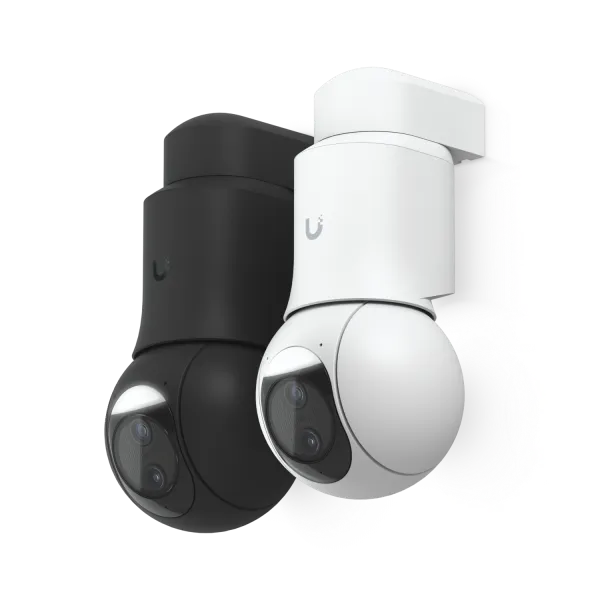
| Manufacturer | Ubiquiti |
|---|---|
| Model | Camera G6 PTZ |
| Category | PTZ security camera |
| Rating | ★★★★☆ |
| Homepage | store.ui.com/us/en/products/uvc-g6-ptz |
Summary
Hands-on UniFi G6 PTZ review: patrol mode covers a wide arc from a corner mount and zoom pulls distant detail. Good image, bulky body, fiddly PTZ controls.
Review
I bought the Ubiquiti Camera G6 PTZ to replace a failed G4 camera on a corner mount, with the plan of using patrol mode to cover a broad arc and the zoom function to pick up details from a distant, otherwise-uncovered space. It has worked well for both purposes. The camera is larger than expected–the pan-tilt mechanism adds a conspicuous cylinder that’s less discreet than a dome–and the PTZ controls take some trial and error to learn, but the image quality is good and patrol mode is easy to configure once you know the basics. Aside from a puzzling Fast Ethernet connection speed, the overall impression is positive.
Specifications
| Spec | Detail |
|---|---|
| Type | Pan-tilt-zoom (PTZ) network camera |
| Pan-tilt cylinder | ~2" across, ~6" long |
| Mounting | Downward-facing mount; optional accessory hides cylinder in-ceiling |
| Patrol mode | Yes, cycles through configured preset views |
| HDR | Yes (I turned it off) |
| Connection | PoE; only linked at Fast Ethernet in my install |
Physical Design
The G6 PTZ is larger than I expected. The camera portion looks similar to the G4 but bigger, and it adds a large cylinder – roughly 2" across and 6" long – that houses the pan-tilt mechanism. This cylinder can protrude out of a downward-facing mount point, or with an extra accessory, be hidden inside the ceiling. If it’s not hidden, it looks odd and stands out. It’s definitely less discreet than a dome camera.
PTZ Controls
The PTZ function works, but the UI is not intuitive. You have to click on an icon to enable PTZ mode, then click on the borders of the camera view to pan and tilt. Zoom in and out are controlled via keyboard shortcuts. It’s functional, but not something you’d figure out without some trial and error.
Patrol Mode
Patrol mode is easy to configure once you know the basics – you just choose which of your preset views to include in the patrol. Setting those preset views is simple once you figure it out, but not obvious, since it’s done via a hotkey.
It’s important to understand the camera’s natural orientation. There’s a point on the rotation circle that the camera cannot pass through, and you’ll want that point oriented towards an area you don’t need to cover. This matters mainly for patrols: if the short path between two presets passes through the rotation limit, the camera has to go the long way around instead.
Image Quality
Image quality is good. I found the HDR support more distracting than helpful and turned it off.
Networking
For some reason, this camera only connected at Fast Ethernet speeds, not even 1 GbE. This may be an issue with the cable run, since the previous camera at the same location had a similar problem – even after I replaced the cable.
Frequently Asked Questions
How do you set up patrol mode on the G6 PTZ? Once you know the basics it’s easy – you pick which of your saved preset views to include in the patrol. Setting those presets is simple but not obvious, since it’s done with a hotkey.
What’s the catch with patrol mode? The camera has a point on its rotation circle it can’t pass through. Orient that gap toward an area you don’t care about. If the short path between two presets crosses that limit, the camera takes the long way around.
Can the G6 PTZ be mounted in the ceiling? Yes. The pan-tilt cylinder can protrude from a downward-facing mount, or with an extra accessory be hidden inside the ceiling. Left exposed, it looks odd and stands out – it’s less discreet than a dome.
Is the PTZ control interface easy to use? No. You click an icon to enable PTZ mode, click the borders of the view to pan and tilt, and zoom with keyboard shortcuts. It works, but you won’t figure it out without trial and error.
How is the image quality? Good. I found the HDR support more distracting than helpful and turned it off.
Does it run at gigabit? Not for me – it only connected at Fast Ethernet, not even 1 GbE. The previous camera at the same spot had the same problem even after I replaced the cable, so I suspect the cable run.
Overall
So far the impression is positive, aside from the Ethernet speed issue. The G6 PTZ does what I bought it for: covering a wide area from a corner mount using patrol mode, with the ability to zoom in on distant spots. Just be prepared for a camera that’s bigger and less discreet than a typical dome, and a PTZ interface that takes some getting used to.