Hardware Review
Ubiquiti Switch Flex 2.5G PoE
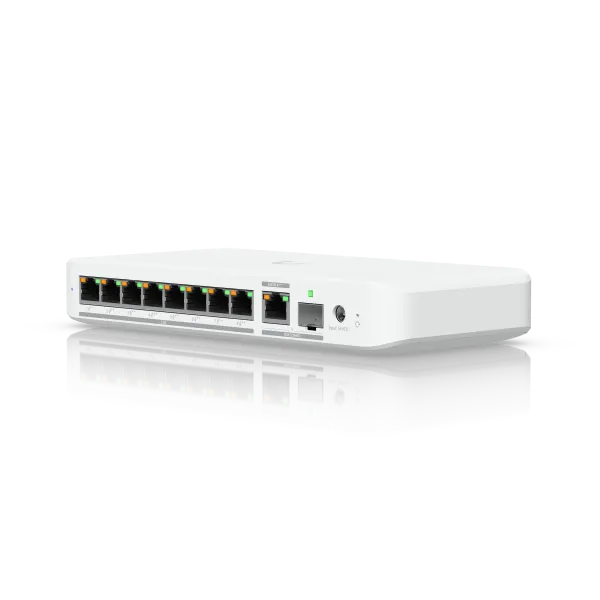
| Manufacturer | Ubiquiti |
|---|---|
| Model | Switch Flex 2.5G PoE |
| Category | PoE network switch |
| Rating | ★★★★☆ |
| Homepage | store.ui.com/us/en/products/usw-flex-2-5g-8-poe |
Summary
Review of the Ubiquiti UniFi Switch Flex 2.5G PoE: 8 ports of 2.5GbE plus a 10GbE uplink that provides PoE power to devices. A distribution switch for remote sites.
Review
The Switch Flex 2.5G PoE shares the same port layout as its non-PoE sibling–eight 2.5GbE ports with a 10GbE uplink–but this version provides PoE to connected devices instead of being powered by PoE. That distinction changes where it fits in your network. This is the switch for remote locations where you need both 2.5GbE connectivity and PoE power delivery without running back to your main switch for each device: a network closet with an access point and a few wired devices, a detached building, anywhere you want to extend both data and power distribution from a single unit. It’s physically larger than the non-PoE version and requires its own power supply–that’s the tradeoff for providing power instead of just consuming it.
Specifications
| Spec | Detail |
|---|---|
| Ports | 8 × 2.5GbE |
| Uplink | 10GbE (with SFP port for other uplink types) |
| Per-port maximum | 2.5GbE |
| Switching | Managed |
| PoE | Provides PoE to connected devices |
| Power | Own power supply required |
The Difference
The regular Switch Flex 2.5G is powered by PoE and makes a clean desktop unit. This version is larger, requires its own power supply, and delivers PoE power to connected devices.
Same ports, different purpose. Make sure you buy the one you need.
Don’t confuse either one with the Flex Mini models.
The Use Case
This is for locations where you need both 2.5GbE connectivity and PoE power delivery without running back to your main switch for each device. A remote closet with an access point and a few wired devices, a detached building, anywhere you want to extend both data and power distribution.
The 10GbE uplink keeps the switch fed, and the PoE output powers your cameras, access points, or other PoE devices locally.
The Bandwidth Reality
Same as the non-PoE version: the 10GbE uplink prevents congestion, but individual ports max out at 2.5GbE. The uplink is for aggregate bandwidth, not single-device speed.
The 10GbE port also has an SFP port for other uplink types. If you have a fiber cable for your uplink, this will be convenient for keeping the switch cooler, but you can still only have either the 10GbE port or the SFP port active, not both at once.
The Tradeoff
You lose the clean PoE-powered simplicity of the non-PoE version. This switch needs its own power supply, which means another outlet and another cable. The physical footprint is larger too.
That’s the price of providing PoE instead of just consuming it.
Frequently Asked Questions
What’s the difference between this and the regular Switch Flex 2.5G? Same eight-port 2.5GbE layout with a 10GbE uplink, but this version provides PoE to connected devices instead of being powered by PoE. It’s physically larger and requires its own power supply.
What’s it for? Locations where you need both 2.5GbE connectivity and PoE power delivery without running back to your main switch for each device–a remote closet with an access point and a few wired devices, a detached building, anywhere you want to extend both data and power distribution.
Do individual ports run at 10GbE? No. Same as the non-PoE version: the 10GbE uplink prevents congestion, but individual ports max out at 2.5GbE. The uplink is for aggregate bandwidth, not single-device speed.
Can I use fiber for the uplink? Yes. The 10GbE port has an SFP port for other uplink types, convenient for keeping the switch cooler with a fiber cable. But you can only have either the 10GbE port or the SFP port active, not both at once.
Can I use it as a desktop switch? You could, but it’s not really meant for that. You lose the clean PoE-powered simplicity of the non-PoE version–this one needs its own power supply, another outlet, and another cable, and the footprint is larger. It’s a distribution switch for remote locations where you need to power devices locally.
Verdict
The Switch Flex 2.5G PoE fills a specific niche: 2.5GbE switching with PoE output in a compact form factor. It’s not a desktop switch, though it could be used as one; it’s a distribution switch for remote locations where you need to power devices locally. Pair it with the 10GbE uplink and you have a capable satellite switch for your main network infrastructure.