Hardware Review
Ubiquiti Switch Pro Max 16 PoE
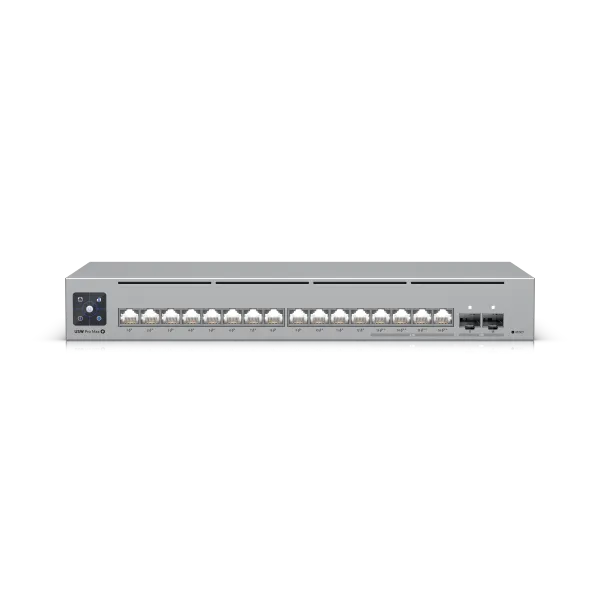
| Manufacturer | Ubiquiti |
|---|---|
| Model | Switch Pro Max 16 PoE |
| Category | PoE network switch |
| Rating | ★★★☆☆ |
| Homepage | store.ui.com/us/en/products/usw-pro-max-16-poe |
Summary
Review of the UniFi USW-Pro-Max-16-PoE: four 2.5GbE PoE++ ports, twelve 1GbE, two 10GbE SFP+, fanless. A real but narrow niche; a Flex 2.5GbE usually beats it.
Review
The Ubiquiti USW-Pro-Max-16-PoE occupies an awkward middle ground between a central rackmount switch for an entire building and the smaller Flex switches aimed at prosumer or satellite use cases. The sixteen ports are split unevenly: four run at 2.5GbE with PoE++, while the remaining twelve are 1GbE only, which means you need to think carefully about what gets plugged in where. Two SFP+ ports provide 10GbE capability, and the fanless design is a genuine plus for closet installations. In my setup it serves as a secondary closet switch with 10GbE uplinks in both directions, but for most use cases one of the Flex 2.5GbE 8-port models will be a better fit. The niche this switch fills is real but narrow.
Specifications
| Spec | Detail |
|---|---|
| RJ45 ports | 16 (4 × 2.5GbE PoE++, 12 × 1GbE PoE+) |
| PoE | All ports PoE+ minimum; four PoE++ |
| SFP+ ports | 2, 10GbE |
| Cooling | Fanless |
| PoE input | None |
| Extras | LED display, Etherlighting |
The Port Layout
All sixteen RJ45 ports support at least PoE+, with four of them stepping up to PoE++. Those same four ports are 2.5GbE, while the remaining twelve are 1GbE only. Two SFP+ ports round things out with 10GbE capability.
This split design means you need to think carefully about what gets plugged in where. If you need more than six fast ports, you’re out of luck. If you only need six or less, you should probably buy something else entirely.
My Use Case
This switch lives in a secondary network closet. One SFP+ port provides a 10GbE uplink to my main network room over existing copper cabling–I would have used fibre if I’d had the option to run it. The other SFP+ port feeds 10GbE to my office, where it connects to the single 10GbE port on a 2.5GbE Flex switch until I can get a 10GbE Flex Mini.
The four 2.5GbE ports serve clusters of hardware where the faster network speed is useful. The remaining 1GbE ports handle a handful of connections to things like printers, where infrequent use makes speed irrelevant.
Physical Design
The fanless design is a genuine plus for a closet installation–no noise to worry about, but more importantly, less heat to build up. However, the LED display and etherlighting feel out of place in what is basically a normal closet. These are features designed to look impressive in a visible rack, not hidden behind a closet door.
Downsides
- No PoE input: You can’t power the switch itself with PoE, so you’ll need a separate power run to wherever it’s installed.
- Port allocation headaches: With only four 2.5GbE/PoE++ ports and twelve 1GbE ports, you need to be deliberate about what goes where for both speed and power delivery.
- Boot time: The switch takes a surprisingly long time to start up. Several minutes, in fact. Plan accordingly for power outages or firmware updates.
Frequently Asked Questions
How are the 16 ports split? Four ports run at 2.5GbE with PoE++; the other twelve are 1GbE only. All sixteen support at least PoE+. You need to think carefully about what gets plugged in where.
How many 2.5GbE ports does it have? Four. If you need more than six fast ports you’re out of luck, and if you only need six or fewer you should probably buy something else.
What about 10GbE uplinks? Two SFP+ ports give you 10GbE. In my setup one uplinks to the main network room over copper and the other feeds 10GbE to my office.
Is it fanless? Yes, and that’s a genuine plus for a closet–no noise, and less heat buildup. The catch is the LED display and Etherlighting feel wasted behind a closet door.
Can I power it over PoE? No. There’s no PoE input, so you’ll need a separate power run wherever it goes.
Anything surprising about setup? Boot time. It takes several minutes to start up–plan accordingly for power outages and firmware updates.
Should I buy this or a Flex 2.5GbE switch? For almost everyone, a Flex 2.5GbE 8-port is the better fit. This only wins when you need more than eight 1GbE ports, some 2.5GbE but not many, and two 10GbE links instead of one.
Verdict
The only real use case for this product is where you need more than eight 1GbE ports, some 2.5GbE ports but not more than six (or four with PoE++), and you need two 10GbE or 10G fibre connections instead of just one.
For almost all cases, one of the Flex 2.5GbE 8-port models (non-PoE or PoE ) will be better. For 5% of the remaining use cases, two Flex 2.5GbE switches and a short patch cable will still be better. For the final 5%, where you genuinely need a second 10GbE link, this will work. Just don’t be surprised by the 4 × 2.5GbE / 12 × 1GbE split, and make sure you only need four or six fast ports.
And you won’t need a motion-detector light in your closet anymore.